The Hermes Casino VIP login uses the same email and password credentials as your standard account - no separate registration or additional login portal exists. Once CasinohermesLTD grants VIP status based on your playing activity, the dashboard automatically expands to display exclusive features including personal manager contact details, cashback tracking, and tailored bonus offers. As of April 2026, VIP members at Hermes Casino access elevated withdrawal limits above the standard €3,000 weekly cap, priority payout processing, and cashback up to 25% on net losses. This page covers how to sign in, what the VIP dashboard includes, troubleshooting steps for missing features, and mobile access options.
Signing Into Your VIP Account
The VIP login process at Hermes Casino is identical to the standard login. No special URL, separate app, or unique credentials are required.
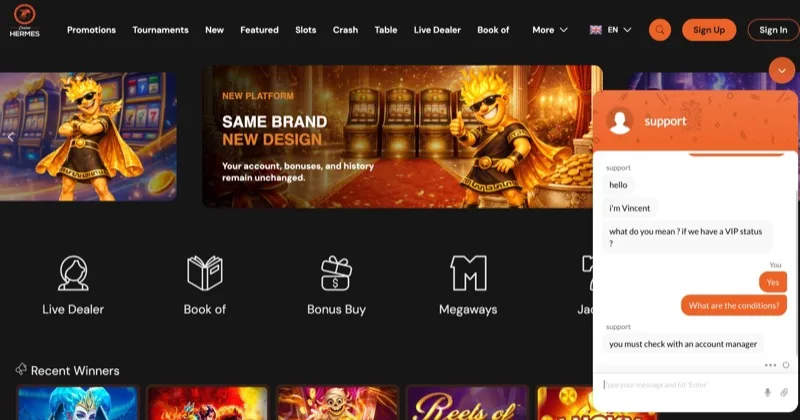
Step-by-Step VIP Login
Navigate to the Hermes Casino homepage and click the "Sign In" button in the upper-right corner. Enter your registered email address and password. Click submit. The system recognises your VIP status automatically and loads the expanded dashboard with additional sections not visible to standard accounts.
That takes under 15 seconds on a stable connection. If you have not yet registered, start with the account creation process and work toward VIP eligibility through regular deposits and gameplay across the 3,200+ game library from 28 providers.
VIP Dashboard Features After Login
Once logged in, VIP members see several additional sections beyond the standard account interface:
- Personal manager contact - direct email channel and sometimes a scheduled callback option for your assigned VIP manager
- Cashback tracker - current cycle percentage (up to 25%), accumulated cashback amount, and countdown to the next payout
- Exclusive promotions - tailored bonuses and offers not listed on the public Promotions page, including personalised reload matches
- Enhanced withdrawal limits - your specific VIP caps for weekly and monthly cashouts, which exceed the standard €3,000/week and €50,000/month
- Priority withdrawal status - real-time tracking showing expedited processing position in the payout queue
The dashboard layout adapts to your screen. On mobile devices, these VIP sections stack below the standard balance and game history panels.
Tip: Bookmark the Hermes Casino website or add it to your home screen for faster VIP access. On iOS, tap the share icon and select "Add to Home Screen." On Android, use the three-dot menu. The PWA launches in a standalone window without browser chrome.
Troubleshooting VIP Login Issues
Although the VIP login shares the same mechanism as standard accounts, several issues are specific to newly promoted VIP members or players accessing their accounts after extended breaks.
VIP Features Not Displaying After Login
If you recently received VIP status but the expanded dashboard does not appear after signing in, try these steps in order:
- Clear browser cache and cookies - cached session data from your pre-VIP account sometimes prevents the updated dashboard from loading
- Log out completely and sign in again - a fresh session forces the system to reload your current account tier
- Try a different browser - Chrome, Firefox, Safari, or Edge may handle the session differently
- Check for pending emails - Hermes Casino typically sends a VIP confirmation email; if you have not received one, your status may still be under review
- Contact 24/7 live chat - support agents can confirm your VIP status and troubleshoot display issues directly
Dashboard updates sometimes take up to 24 hours after VIP activation. If the features still do not appear after clearing your cache and waiting a full day, the support team can escalate the issue to your assigned account manager.
Password and Access Problems
Standard login troubleshooting applies to VIP accounts. Use the "Forgot Password" reset link if you cannot remember your credentials. The reset email typically arrives within 2 to 5 minutes. VIP members who experience repeated login failures should contact their personal manager directly rather than going through general support, because the manager can often resolve account locks faster due to priority handling.
Remember that Hermes Casino charges a €5 monthly dormancy fee on accounts inactive for 6 or more months. If your VIP account has been inactive, log in at least once every 5 months to prevent balance deductions.
Mobile VIP Login and Access
All VIP features at Hermes Casino work through the mobile browser version without requiring a dedicated app download from the App Store or Google Play.
Accessing VIP Features on Phone and Tablet
The Hermes Casino PWA adapts to smartphone and tablet screens automatically. After signing in on mobile, the VIP dashboard sections - manager contact, cashback tracking, exclusive promotions - appear in the same layout as desktop, reformatted for vertical scrolling. Payment methods including crypto deposits, bonus activation, and game access all function identically across devices.
VIP members who play frequently on mobile should enable push notifications through the browser settings to receive alerts about exclusive VIP promotions, cashback payouts, and withdrawal approvals in real time.
Session Timeout Considerations
Mobile browsers sometimes terminate background sessions to conserve memory. VIP players may find themselves logged out more frequently on phones than on desktop computers. Keep your password saved in a manager like Bitwarden or 1Password for quick re-authentication. Your balance, game progress, and VIP features remain intact regardless of session interruptions.
Comparing VIP and Standard Account Access
| Feature | Standard Login | VIP Login |
|---|---|---|
| Credentials | Email + password | Same email + password |
| Login URL | hermescasino10.com | Same URL |
| Dashboard | Balance, games, transactions | Expanded with VIP sections |
| Account Manager | No | Dedicated personal manager |
| Cashback Tracking | Not available | Up to 25%, visible in dashboard |
| Withdrawal Limits | €3,000/week, €50,000/month | Higher (VIP-specific) |
| Payout Processing | Standard queue, up to 72 hours | Priority queue, faster approval |
| Exclusive Bonuses | Public promotions only | Tailored VIP offers |
| Mobile Access | PWA browser | Same PWA browser |
| Support Priority | General 24/7 live chat | Personal manager + priority chat |
The table confirms that VIP login does not require separate credentials or a different access point. The distinction lies entirely in what appears after authentication. For a complete breakdown of VIP benefits, including cashback terms and eligibility criteria, visit the VIP programme page.
Strengths and Weaknesses of the VIP Login System
Pros:
- No separate credentials needed - same email and password as your standard account
- VIP dashboard loads automatically after login based on your account tier status
- Personal manager access directly from the dashboard for faster issue resolution
- Real-time cashback tracking shows accumulated returns and payout schedule
- Exclusive bonuses visible immediately after sign-in without manual activation
- Mobile PWA access works identically to desktop for all VIP features
- 24/7 live chat support available alongside dedicated manager contact
Cons:
- VIP features sometimes fail to display for newly promoted members due to browser cache issues
- No dedicated VIP login URL or portal - everything runs through the same interface as standard accounts
- VIP tier thresholds remain undisclosed, making it unclear what activity level triggers promotion
- Dashboard updates may take up to 24 hours after VIP activation
- Mobile session timeouts cause more frequent logouts than desktop browsing
- €5 monthly dormancy fee applies to inactive VIP accounts after 6 months
- Platform carries a Casino.Guru Safety Index of 5.2/10 - see the full review for trust analysis
Frequently Asked Questions
Do VIP Members Need Different Login Credentials?
No. The Hermes Casino VIP login uses your existing email and password from registration. VIP status is tied to your account profile, not to separate credentials. The system automatically detects your VIP tier and loads the expanded dashboard with manager contact, cashback tracking, and exclusive offers after standard authentication.
Why Are VIP Features Not Showing After Login?
The most common cause is cached browser data from your pre-VIP session. Clear your browser cache and cookies, log out completely, and sign in again. If the features still do not appear after 24 hours, contact 24/7 live chat to confirm that your VIP status has been activated. Trying a different browser or device sometimes resolves persistent display issues.
Can You Access VIP Features on Mobile?
All Hermes Casino VIP features work through the mobile browser PWA on iOS and Android devices. The VIP dashboard, manager contact, cashback tracker, and exclusive promotions appear in the same format as desktop. Add the casino to your home screen for faster access. No app download is required from the App Store or Google Play.
How Do You Become a VIP at Hermes Casino?
The VIP programme at Hermes Casino operates on an invitation basis. Regular deposits, consistent wagering across the 3,200+ game library, and maintained account standing typically influence eligibility. The casino does not publish specific deposit thresholds or point requirements. Contact 24/7 live chat or email [email protected] to enquire about your current VIP eligibility status.
What Happens to VIP Status During Account Inactivity?
VIP accounts at Hermes Casino follow the same dormancy rules as standard accounts. After 6 months without logging in, a €5 monthly fee is deducted from your balance. VIP status itself may also be reviewed during extended inactivity periods. Log in at least once every 5 months to maintain both your balance and your VIP tier. Claim a bonus code during your login session to keep your account active with minimal effort.